Bespin + Google Code (SVN) : How to
14 Mar 2010If your new to mozilla bespin refer: http://blog.justin.kelly.org.au/mozilla-bespin-subversion-wow
To use Bespin with Google Code (svn)
- create a bespin account at bespin.mozillalabs.com
- open the bespin command line and execute
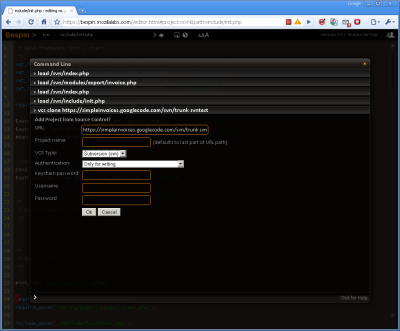
vcs clone https://(yourproject).googlecode.com/svn/trunk
You’ll be asked for:
- a project name
- VCS Type: select
Subversion - Authentication: select
only for writing - Keychain password: create a new password
- Username: enter your google code svn username
- Password: enter your google code svn password
- to commit the code to the local version control user execute
vcs commit
(add your commit message at the prompt)
- to commit the change to googlecode execute
vcs push
All done - to easy - now your coding in the cloud :)
