How to add Pinboard.in 'Search Mine' as a Chrome search engine
20 May 2010For a simple way to search your Pinboard.in bookmarks, you can add Pinboard.in ‘Search Mine’ into Chrome as a search engine follow the below steps:
- In Chrome go to Tools menu, then Options,
- Iin the Default Search section click Manage
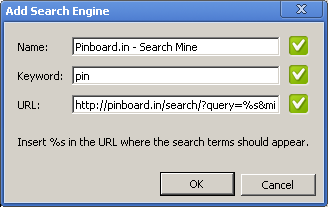
- Click Add and enter the below details in the available fields
Name: Pinboard.in - Search Mine
Keyword: pin
URL:  http://pinboard.in/search/?query=%s&mine=Search+Mine
Refer image below
just type pin followed by what you want, ie ‘pin php arrary’ in the chrome address box
(refer image below) and chrome will now seasrch google maps for that address

